
Price and Volume Trend (PVT)
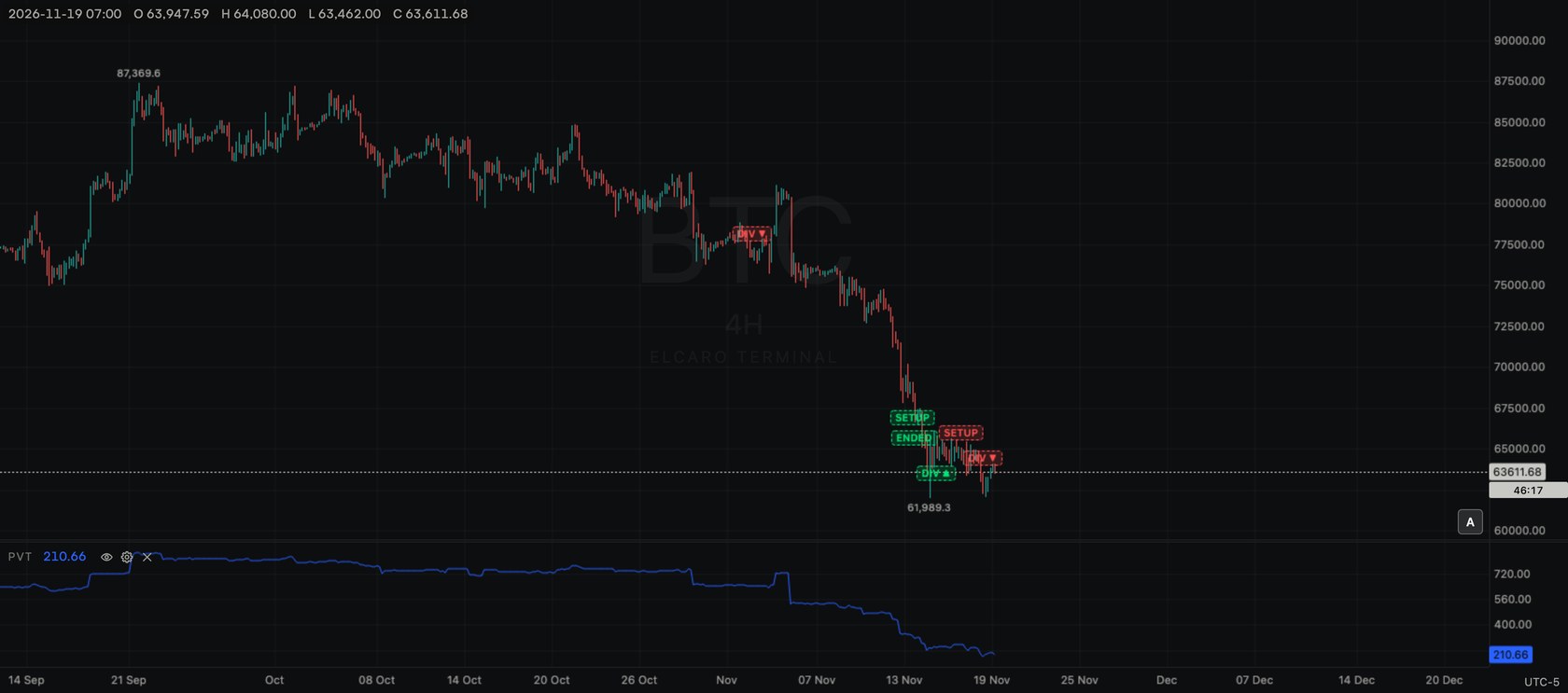
PVT in its own pane: a running total of each bar's volume multiplied by its percent change in price.
Free for every account. No plan needed: add it to any chart, on any asset and any timeframe.
What it shows
PVT keeps a running total, like OBV, but adds only part of each bar's volume: the part that matches the size of the price change. A bar that closes 2% higher adds 2% of its volume; a bar that closes 1% lower takes away 1% of its volume.
PVT = previous PVT + volume × (close − previous close) / previous close
The total starts at the first loaded bar, so the level itself depends on how much history is loaded. Its direction is what counts.
Add it to the chart
- 1. Click Indicators (fx) in the chart header.
- 2. Type
PVTin the search box, or find it under Sub pane. - 3. Click Price and Volume Trend. A new pane opens under the price chart, with a legend row
PVT. - 4. Click the gear on the legend row to change its look.
Settings
- Inputs: none.
- PVT line: blue, width 1 px (1–5 px).
- Visible: hide or show the line.
- Decimals: Automatic shows 2, or a fixed number.
- Reset to defaults returns the colour, width and decimals.
- Pane height: drag the top edge of the pane; double-click it for the default height.
How to read it
- A rising PVT shows volume coming in on bars that close higher, weighted by how much higher.
- A falling PVT shows the same for bars that close lower.
- Small price changes add little, even on heavy volume, so PVT is calmer than OBV on quiet bars.
- Price rising while PVT is flat or falling (or the reverse) is a divergence between price and volume.
Use it with ELCARO
- Look at PVT's direction during the growth and decline phases of the ELCARO filter (VOL) pane.
- Check whether PVT was rising or falling in the bars before the forecast's turning dates.
Good to know
- Needs volume. Assets without volume in their data feed, such as some forex and index feeds, show no values.
- One per chart. Takes one of the 4 indicator panes per chart.
- Counts toward the 10 per chart and toward the free limit of 2 standard indicators at a time, also while hidden.
In the news: indicator pvt
Read next
On Balance Volume (OBV)
OBV in its own pane: a running total of volume, added on bars that close higher and taken away on bars that close lower.
Ease of Movement (EMV)
EMV in its own pane: how far the bar's midpoint moved relative to its range and volume, with its moving average.
Volume (VOL)
The standard Volume pane: volume bars coloured by the bar's direction, with three moving averages of volume.
Standard indicators
The 28 classic indicators of the Terminal, the two groups, how to add, set up, hide and remove one, and how many fit on a chart.