
All updates
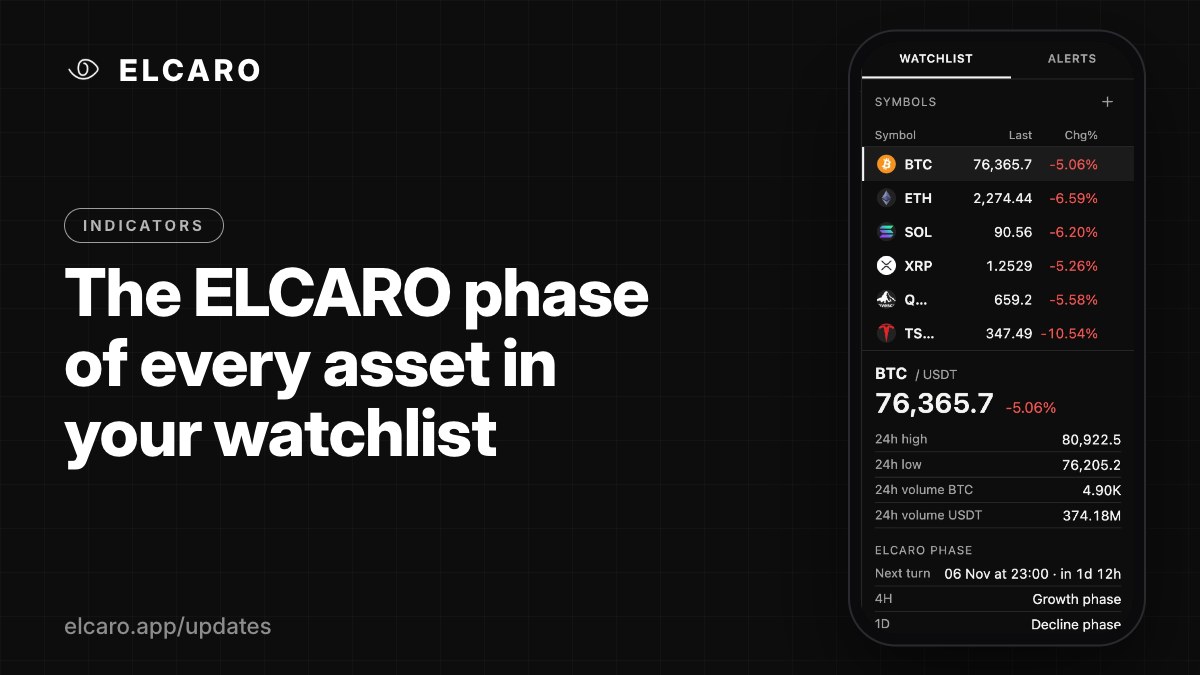 Full guide The ELCARO phase block in the watchlist
Indicators November 6, 2026
The ELCARO phase of every asset in your watchlist
Open an asset in the watchlist to see its phase on 4H, 1D and 1W, the date of the next turn with a countdown, and its channel position.
What it gives you
The watchlist does more than show prices. Select an asset and its details include an ELCARO phase block: a quick read of where the asset is in its cycle, without opening a chart.
What the block shows
- The phase on the chart's timeframe.
- Next turn: the date of the next expected turn, with a countdown.
- The phases on 4H, 1D and 1W side by side.
- Channel position: above, below or inside the grey zone.
- Plus the usual details: last price, 24h high, low and volume.
How to open it
Open the WATCHLIST tab in the right panel and click an asset. Add assets with the search (Cmd/Ctrl+K) and keep the ones you follow in one list.
Good to know
Timeframes outside your plan read "Locked". The watchlist is saved to your account and follows you to every device.