
The ELCARO phase block in the watchlist
How to read an asset's ELCARO phase, the next turn date and the 4H, 1D and 1W phases from the watchlist without opening a chart.
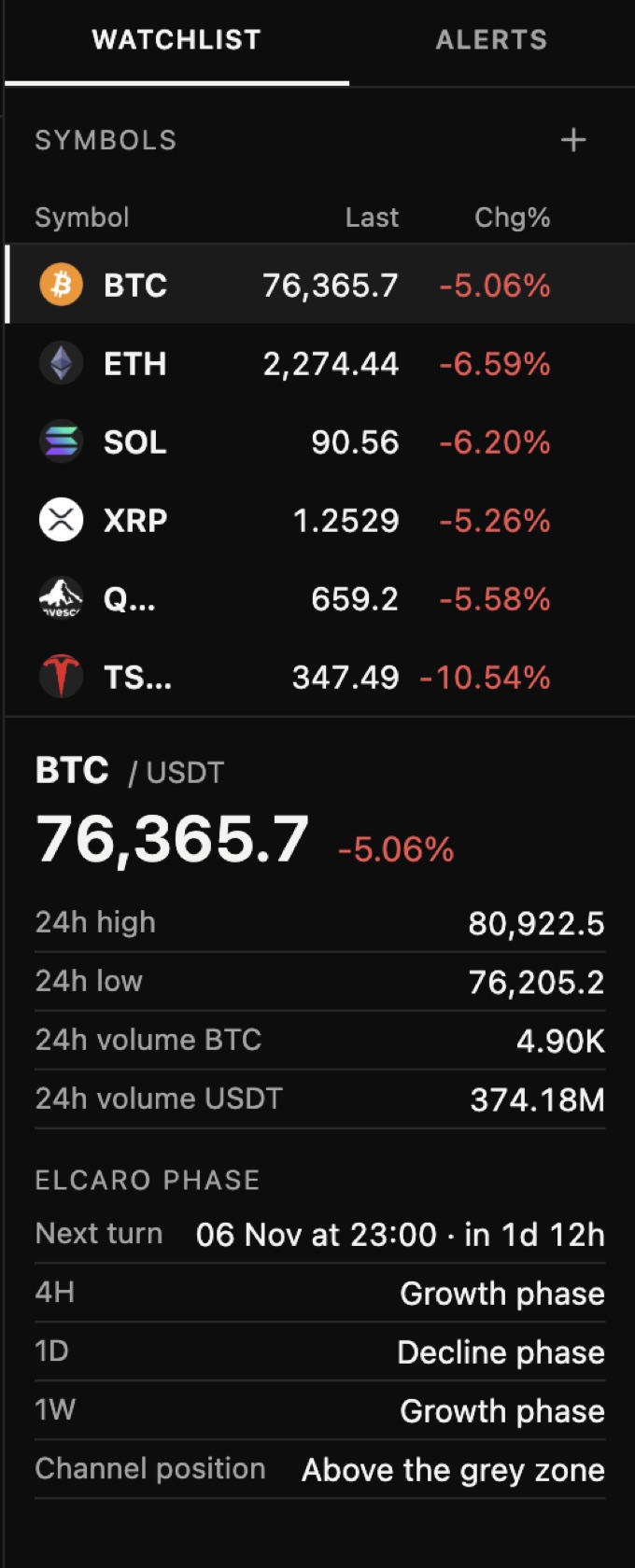
The watchlist can show an asset's ELCARO picture at a glance, without opening its chart.
Open it
- Step 1. Open the WATCHLIST tab in the right panel.
- Step 2. Click an asset. Its details open with 24h high, low and volume, and the ELCARO phase block.
What it shows
- The phase on the chart's timeframe: growth or decline.
- Next turn: the date of the next forecast turn and a countdown.
- 4H, 1D and 1W phases side by side.
- Channel position: above, below or inside the grey zone.
Timeframes outside your plan read Locked.
In the news: elcaro phase in the watchlist
Read next
Layouts, tabs and sync
How to put up to 4 charts in a tab, sync them, use up to 12 tabs, resize charts, take snapshots and change the Terminal settings.
TRAIL and higher-timeframe trail levels
How TRAIL follows the trend, what a flip, a cross and the grey zone mean, how to show the 1H, 4H, 1D and 1W trail on one chart, and TRAIL alerts.
ELCARO Forecast in the Terminal
How to switch the forecast on, read its solid and dashed parts, peaks and troughs, show turn dates, and set an alert before the next turn.
PRIME in the Terminal
What PRIME is, how to switch it on, what each status means (wait, setup, active, ended, stand aside), the protective level and the history strip.