
Fibonacci time, fans, arcs and pitchfan
Fib time zone, speed resistance fan, trend-based fib time, circles, spiral, speed resistance arcs, wedge and pitchfan: what each draws and how to place it.
Free for every account. Every drawing tool works on any chart, on any asset and any timeframe, with no plan.
These tools are in Gann and Fibonacci tools, under the three price-level tools. They spread Fibonacci ratios across time, angles or circles instead of flat price levels.
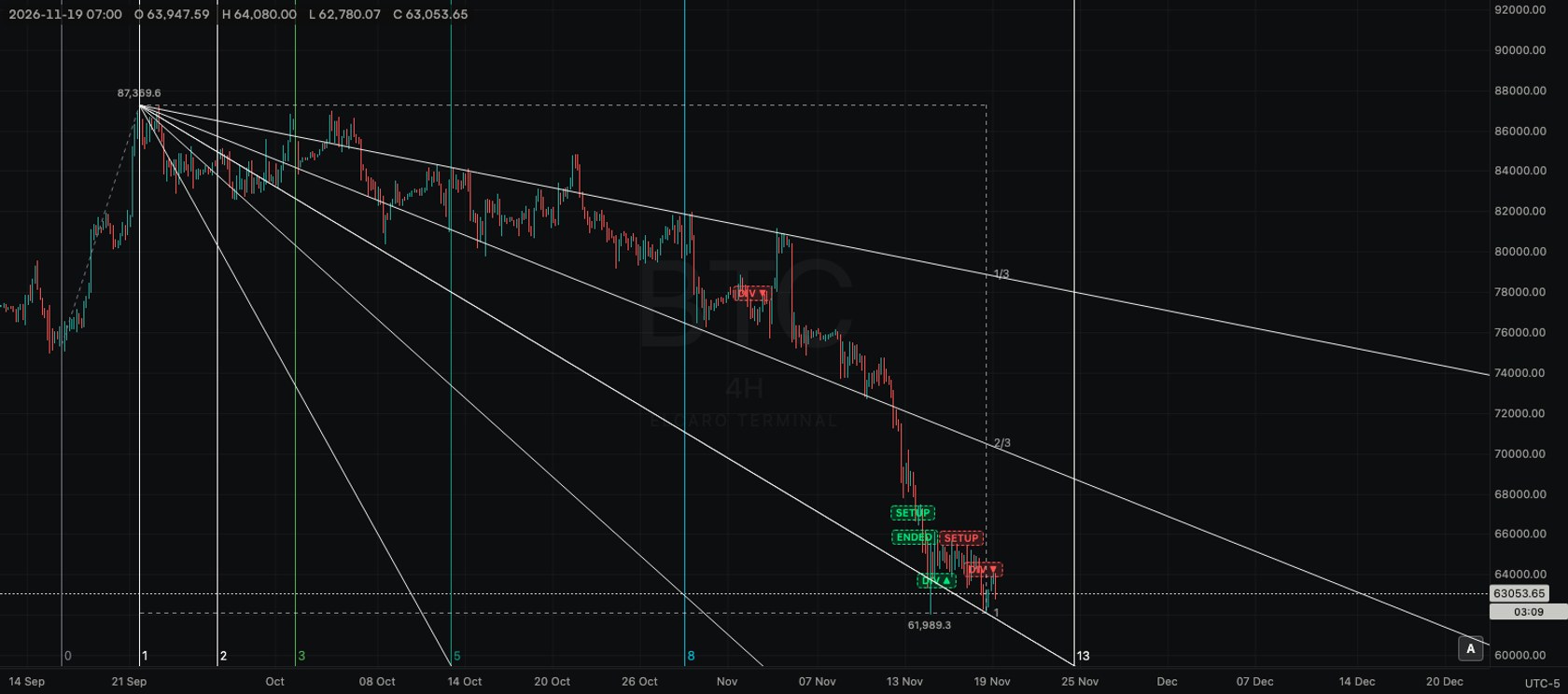
Fib time zone
- What it is: vertical lines at Fibonacci counts of a base distance: 0, 1, 2, 3, 5, 8, 13 and so on, each labelled with its number.
- Points: two clicks. The distance between them is one unit.
- Typical use: set the unit to the gap between two turning points and see whether later turns land near the lines.
Fib speed resistance fan
- What it is: a box between two points and a fan of lines from the first point through one third, two thirds and the whole of the box, both in price and in time.
- Points: two clicks: the start and the end of a move.
- Typical use: see which fan line a pullback stopped at.
Trend-based fib time
- What it is: vertical lines after a third point, spaced by ratios of the first move's duration: 0, 0.382, 0.5, 0.618, 1, 1.382, 1.618, 2, 2.382, 2.618, 3, 3.618 and 4.236.
- Points: three clicks: the start of a move, its end, and the point to count from.
- Typical use: compare when a later swing ended with the length of an earlier one.
Fib circles
- What it is: circles around a centre at 0.236, 0.382, 0.5, 0.618, 0.786 and 1 of a radius, each labelled.
- Points: two clicks: the centre, then a point on the full circle.
- Typical use: centre it on a turning point and set the radius to the next one.
Fib spiral
- What it is: a golden spiral that winds three turns out of a centre and ends at your second point.
- Points: two clicks: the centre, then the end of the spiral.
- Typical use: a visual check of how swings wind around a central point.
Fib speed resistance arcs
- What it is: half circles at 0.236, 0.382, 0.5, 0.618, 0.786 and 1 of the distance between two points, opening towards the second point.
- Points: two clicks.
- Typical use: draw from a low to a high and see where a pullback meets an arc.
Fib wedge
- What it is: a wedge between two rays from one point, with arcs at the same six ratios inside it.
- Points: three clicks: the tip of the wedge, then one point on each ray.
- Typical use: combine angle and distance from one turning point in a single drawing.
Pitchfan
- What it is: a fan of rays from one point through the levels between two other points, at the pitchfork ratios 0.25, 0.382, 0.5, 0.618, 0.75 and 1.
- Points: three clicks: the origin, then two turning points.
- Typical use: the same three swings you would use for a pitchfork, seen as a fan instead of parallel lines.
Tips
- Lines that depend on angles and circles are drawn on screen, so their shape follows your zoom.
- Turn on the Magnet to place points on candle highs and lows.
- Drag a handle to adjust; the lines redraw at once.
Read next
Fibonacci retracement, extension and channel
The three Fibonacci price-level tools: which points to click, which levels they draw and a typical use for each.
Gann tools
Gann box, Gann square fixed, Gann square and Gann fan: what each draws, how many clicks it takes and a typical use.
Drawing tools
How the drawing toolbar works: picking a tool, placing points, selecting and styling a drawing, the magnet, drawing mode, locking, hiding and removing, undo, saving and the phone.