
The phase of every asset, at a glance.
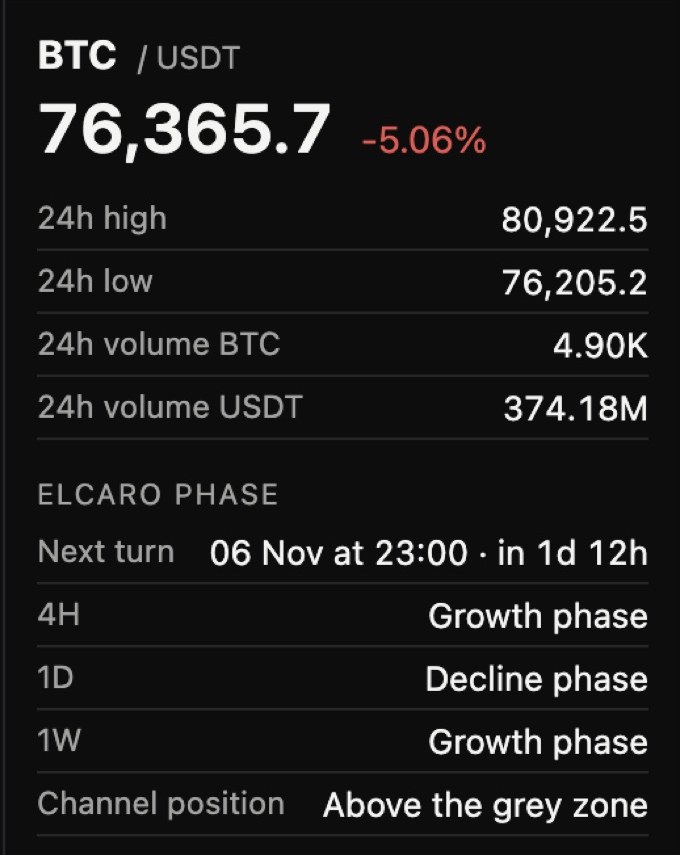
Click an asset in the Terminal watchlist and its ELCARO phase block opens: the phase on the chart's timeframe, the next turn date with a countdown, and the 4H, 1D and 1W phases side by side.
In the ELCARO Terminal. Timeframes outside your plan read Locked.
01
Four readings in one block
Next to the 24h high, low and volume.
- The phase on the chart's timeframe: growth or decline.
- Next turn: the date of the next forecast turn and a countdown.
- 4H, 1D and 1W phases side by side, and where price sits against the grey zone.
Step by step in the guide
Questions.
Where is the phase block? +
Open the WATCHLIST tab in the right panel of the Terminal and click an asset.
Why does a timeframe say Locked? +
That timeframe is outside your plan. The Terminal plan opens all of them.
Related features
Forecast with turn dates When the next growth or decline phase is expected to start, drawn ahead of the last candle. Timeframe alignment A message when the timeframes you pick for an asset point to the same phase. TRAIL A stepped level that follows the trend and marks the bar where it flips.
Educational tools, not financial advice. ELCARO never places orders for you.